Understanding website traffic metrics helps you see how people actually use your site—what brings them in, what keeps them engaged, and where they drop off. This guide explains the key metrics in plain language, so you can make better content, design, and marketing decisions without getting lost in jargon.
- What Website Traffic Metrics Mean
- Key Website Traffic Metrics Explained
- Traffic Sources
- Sessions, Users, and Pageviews
- Engagement Metrics
- Understanding Website Traffic Metrics in Google Analytics
- Website Analytics Tools & Services by WebHostingPeople (India Pricing)
- How to Use Traffic Metrics to Improve Your Website
- People Also Ask
- FAQs
- Conclusion
What Website Traffic Metrics Mean
Website traffic metrics are measurements that show how visitors find your site and what they do once they’re there. They don’t explain why someone behaves a certain way, but they clearly show what happens on your website.
These insights help you:
- Identify content that attracts visitors
- Understand where users lose interest
- Improve pages that are underperforming
If you’re new to tracking performance, you may find What Is Website Analytics? useful.
Key Website Traffic Metrics Explained
Traffic Sources
Traffic sources tell you where visitors come from. The most common ones include:
- Organic search: Visitors from search engines
- Direct traffic: Users typing your website URL directly
- Referral traffic: Visitors from other websites
- Social traffic: Users coming from social media platforms
Knowing this helps you focus on the channels that matter most.
Sessions, Users, and Pageviews
These metrics are often misunderstood:
- Users: Individual visitors to your website
- Sessions: Total visits (one user can have multiple sessions)
- Pageviews: Total number of pages viewed
If sessions are high but pageviews are low, visitors may not be exploring beyond the first page.
Engagement Metrics
Engagement metrics show how visitors interact with your content:
- Bounce rate: Percentage of visitors who leave after viewing one page
- Average session duration: Time users spend on your site
- Pages per session: Number of pages visited per session
Higher engagement usually means your content is relevant and easy to navigate.
Understanding Website Traffic Metrics in Google Analytics
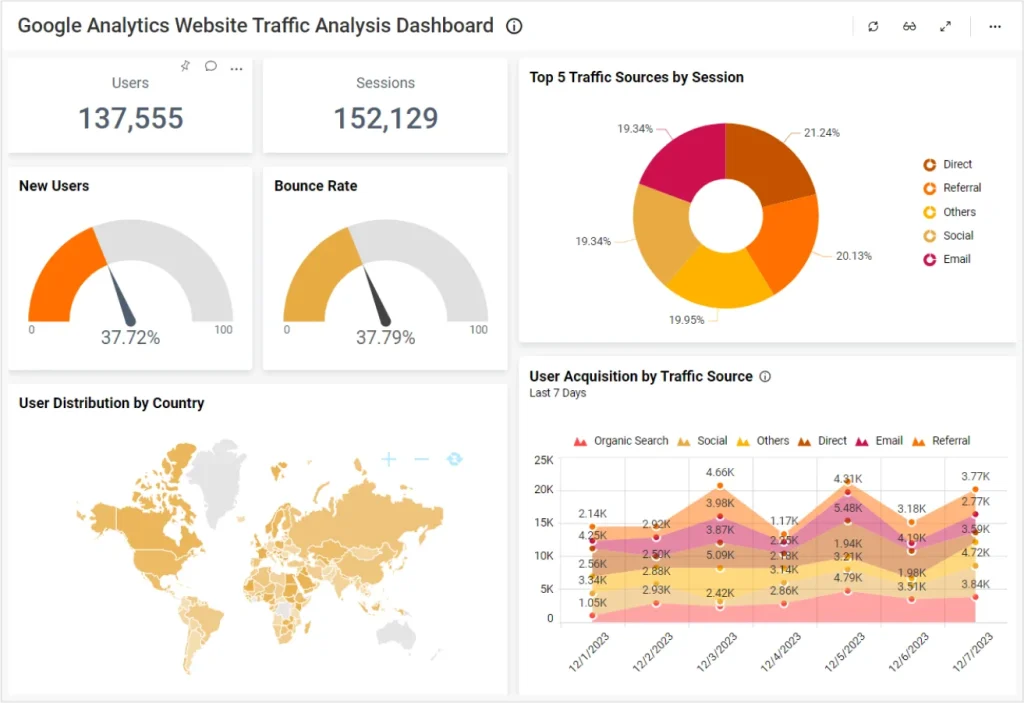
Google Analytics organizes traffic data into easy-to-read reports that answer key questions:
- Where does your traffic come from?
- Which pages perform best?
- How users move through your website
Focus on:
- Acquisition reports to review traffic sources
- Engagement reports to understand user behavior
- Pages reports to identify popular and weak pages
Website analytics setup support by WebHostingPeople
Website Analytics Tools & Services by WebHostingPeople (India Pricing)
WebHostingPeople provides built-in and optional analytics-related services to help website owners track traffic and performance without relying entirely on external platforms.
| Tool / Service | What It Helps With | Typical Pricing (India) |
|---|---|---|
| Server Traffic Statistics (cPanel) | Visitor counts, bandwidth usage | Included with hosting |
| Analytics Integration Support | Google Analytics & Search Console setup | Included / On request |
| Website Performance Monitoring | Page speed and uptime tracking | Included in select plans |
| Advanced Analytics Setup Assistance | Goals, events, custom dashboards | ₹1,500 – ₹3,000 (one-time) |
Pricing may vary based on hosting plan and technical requirements.
WebHostingPeople analytics and monitoring features
How to Use Traffic Metrics to Improve Your Website
Website traffic metrics are useful only when applied correctly:
- Improve pages with high traffic but low engagement
- Expand content that brings consistent organic visitors
- Fix slow or confusing pages with high exit rates
Regular monthly reviews are enough for most websites.
How to Improve Website Engagement
Google Analytics Help documentation
People Also Ask
What is the most important website traffic metric?
There is no single best metric. Traffic sources show visibility, while engagement metrics show content quality.
Is high website traffic always good?
No. Traffic without engagement or conversions usually indicates poor targeting.
How often should website traffic be checked?
Monthly reviews are sufficient for most websites, with weekly checks during active campaigns.
FAQs
What is a good bounce rate for a website?
A bounce rate between 40% and 60% is considered normal for most sites.
Can traffic metrics help improve SEO?
Yes. Engagement data helps identify content improvements that support SEO.
Do small websites need analytics?
Yes. Even basic tracking helps understand growth and user behavior.
Are free analytics tools enough?
For many websites, free tools like Google Analytics and Search Console are sufficient.
Conclusion
Website traffic metrics are not about chasing numbers. They help you understand how real users interact with your website. When reviewed regularly, these insights guide better content decisions, improve user experience, and support steady website growth.