Common DNS problems are one of the most frequent reasons websites become unreachable, emails stop working, or users see errors like “Server not found.” DNS (Domain Name System) acts like the internet’s phonebook, translating domain names into IP addresses. When something goes wrong here, even a perfectly working server can appear “down.”
In this guide, we’ll explain the most common DNS issues in simple terms, how to identify them, and practical steps to fix them. Examples and pricing are shared with Indian users in mind, including real-world scenarios faced by website owners.
Understanding How DNS Works (Quick Overview)
When someone types your domain name into a browser:
- The browser asks a DNS resolver for the IP address.
- The resolver checks authoritative nameservers.
- The IP address is returned.
- The browser connects to the server.
If any step fails, your site or service becomes unreachable.
Common DNS Problems and How to Fix Them
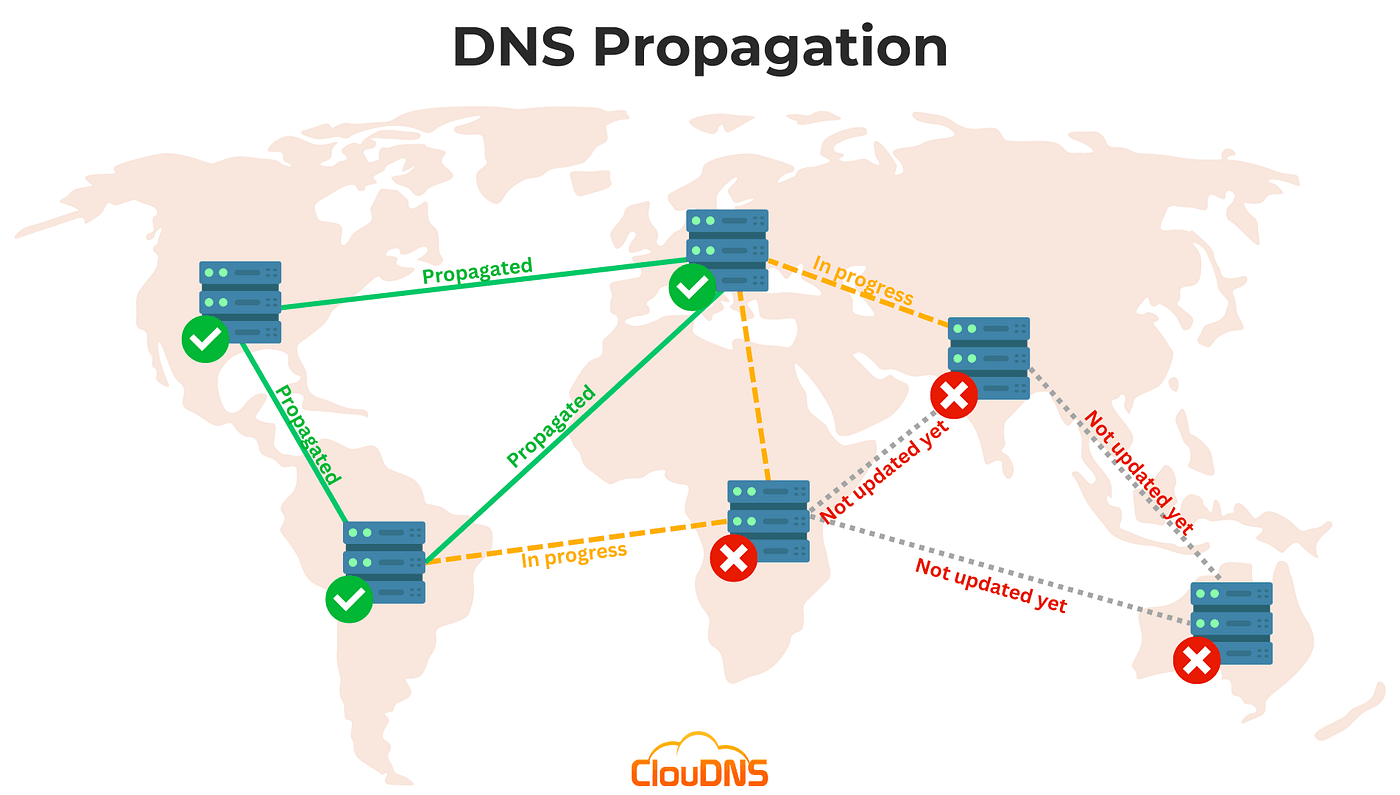
1. DNS Propagation Delays
After changing nameservers or DNS records, updates don’t apply instantly. This delay is called propagation.
Symptoms
- Website loads in some locations but not others
- Email works intermittently
Fix
- Wait 24–48 hours after changes
- Avoid making repeated edits during propagation
- Use online DNS check tools to monitor progress
2. Incorrect DNS Records
Wrong A records, MX records, or CNAME entries are a frequent cause of downtime.
Symptoms
- Website shows hosting provider’s default page
- Emails bounce or never arrive
Fix
- Verify records with your hosting provider
- Ensure A record points to the correct server IP
- Confirm MX records match your email service
How to Configure DNS Records Correctly
3. Nameserver Misconfiguration (Primary Keyword Section)
Nameserver issues are among the most common DNS problems and usually happen during domain transfers or new registrations.
Symptoms
- Domain shows “DNS not found”
- Website never loads anywhere
Fix
- Confirm nameservers match your hosting provider
- Ensure at least two active nameservers are set
- Allow time for DNS propagation after updates
Domain & DNS Management at WebHostingPeople
4. DNS Cache Issues
ISPs, browsers, and operating systems store DNS data to speed up loading.
Symptoms
- Website works on mobile data but not broadband
- Changes don’t reflect on your device
Fix
- Clear browser DNS cache
- Flush local DNS cache (
ipconfig /flushdnson Windows) - Restart router if needed
5. Domain Expiry or Suspension
If a domain expires, DNS stops resolving entirely.
Symptoms
- Sudden site and email failure
- Registrar parking page appears
Fix
- Renew the domain immediately
- Check domain status at your registrar
- Enable auto-renewal
At WebHostingPeople, .in domains are available at ₹555/year, and as an accredited .in registrar, domain renewals and DNS updates are handled directly without third-party delays.
DNS Pricing Comparison (India)
| DNS / Domain Service | Typical Cost (₹/Year) | Notes |
|---|---|---|
.in Domain Registration | 555 | Government-accredited registrar |
| Basic DNS Management | Included | With most hosting plans |
| Premium DNS Services | 1,500 – 4,000 | Faster global resolution |
| Managed DNS Add-ons | 1,000 – 3,000 | Useful for businesses |
People Also Ask About DNS
Why does my website work on one network but not another?
This usually happens due to DNS cache or propagation delays across ISPs.
How long does DNS propagation take in India?
Typically 4–24 hours, but in rare cases up to 48 hours.
Can DNS issues affect email delivery?
Yes. Incorrect MX or SPF records directly impact email reliability.
Is DNS managed by hosting or domain provider?
DNS can be managed by either, depending on where nameservers point.
Frequently Asked Questions
What is the fastest way to fix DNS issues?
Start by checking nameservers and DNS records, then clear local DNS cache.
Can I change DNS without downtime?
Yes, if changes are planned and existing records are copied correctly.
How often should DNS records be reviewed?
At least once every 6–12 months or after any server change.
Do cheap domains cause DNS problems?
No. Issues come from configuration errors, not pricing.
Useful Resources
What Happens When a Domain Expires?
Buy .in Domains from WebHostingPeople
DNS problems can look complicated, but most are caused by small configuration mistakes, cache delays, or expired domains. Understanding how DNS works and knowing where to check first can save hours of downtime and confusion.
By keeping DNS records clean, monitoring expiry dates, and using a reliable registrar and hosting provider like WebHostingPeople, website owners can avoid most DNS-related issues altogether.